
 Sign in to Mod The Sims
 New Toddler Mirror - **MAJOR UPDATE 4th March** - Please re-download!
 New Toddler Mirror - **MAJOR UPDATE 4th March** - Please re-download!
MTS has all free content, all the time. Donate to help keep it running.
SCREENSHOTS
colours.jpg - width=700 height=341
animations.jpg - width=800 height=600
girl side.jpg - width=526 height=441
main.jpg - width=541 height=547
new.jpg - width=942 height=770
new2.jpg - width=798 height=896
Featured Upload!
This is a featured upload! It showcases the best talent and creativity available on MTS and in the community. 

************* MAJOR UPDATE - 4th March*******************
Please re-download. The files has the SAME name as the original release so it will simply overwrite you old file....
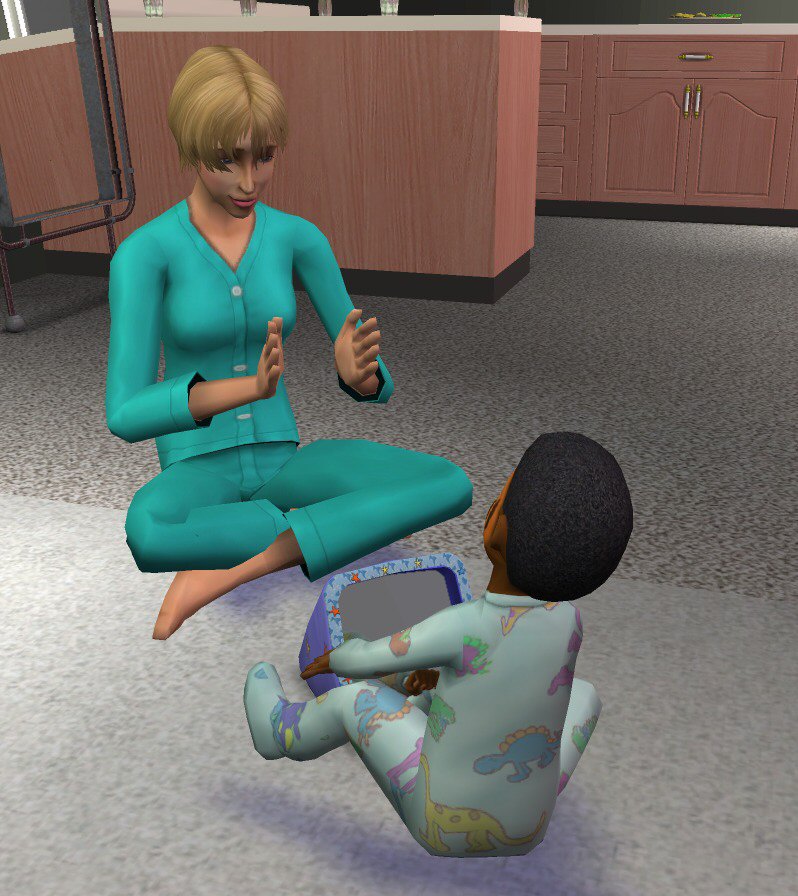
ADDED: New interaction for adults: now they can "Join" the toddler when he looks at himself in the mirror.
ADDED: The Toddler Mirror can now be "stepped over", like other small objects placed on the ground.
FIXED: The colour changing to pink at the end of the "Change Appearance" interaction.
FIXED: The interactions can now be correctly canceled.
FIXED: The message displayed when the Body skill point is gained doesn't mention any more the "Charisma" skill.
FIXED: The Catalogue Description now correctly displays the "+Body" tag (instead of "+Creativity").
(Also tested with OFB....works perfectly!)
***************************************************
This time it's a 'toddler friendly' mirror, made from a soft outer non- allergic man made material and an unbreakable (polished non-toxic metal coated) plastic mirror - for maximum protection for your little ones....
As usual, I just made the mesh and textures and Numenor did all the 'magic' in making it a 'usable' object for Toddlers. The mirror has a fully working reflection surface, and can only be placed on the ground (not surfaces) - because the toddler need to crawl to it in order to use it.
There are TWO pie menu options:
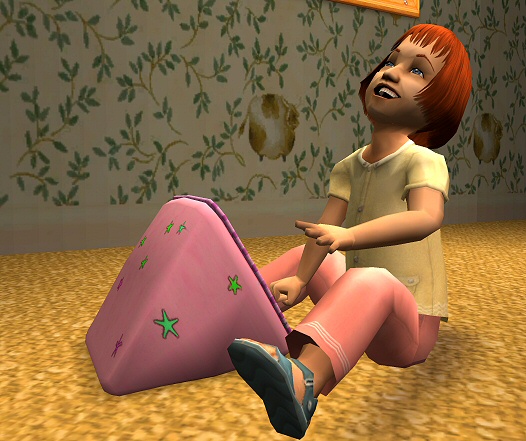
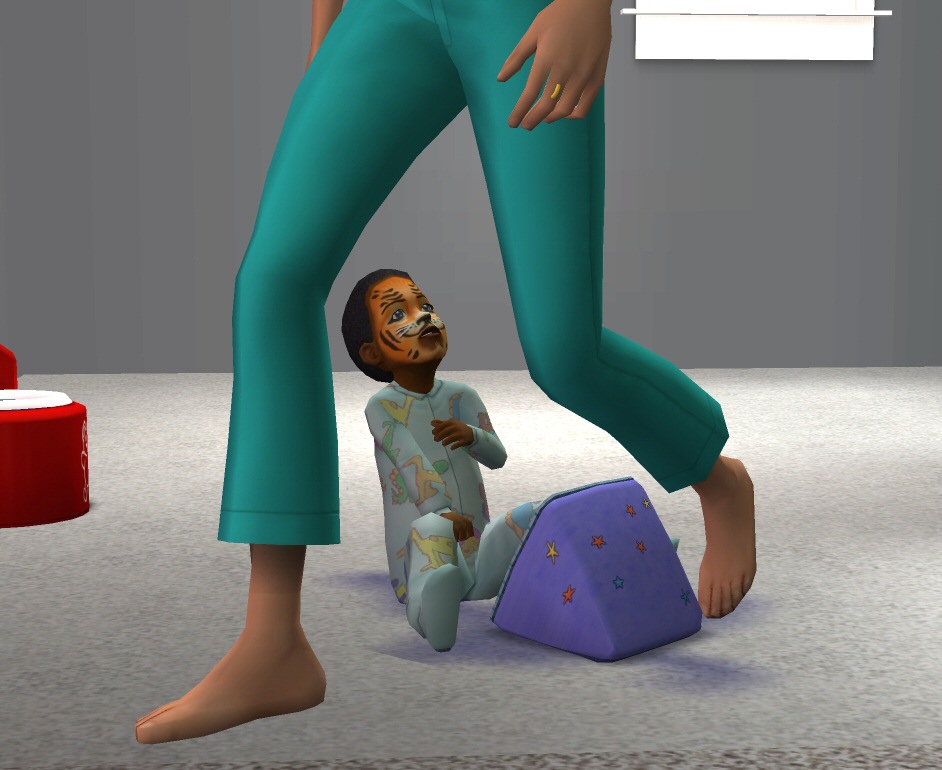
1) "Look who's in the mirror!" - This allows your Toddlers to 'play' with the mirror... This included several animations, but, more importantly, playing with the mirror will slowly increase their 'body skill - because your toddler is learning to take care their face (:confused ... and you will receive a custom message once the toddler has gained a body point!
2) "Change appearence" - This works the same as the 'change appearence' for other Sims, and will allow you to change hair, makeup, accessories etc.
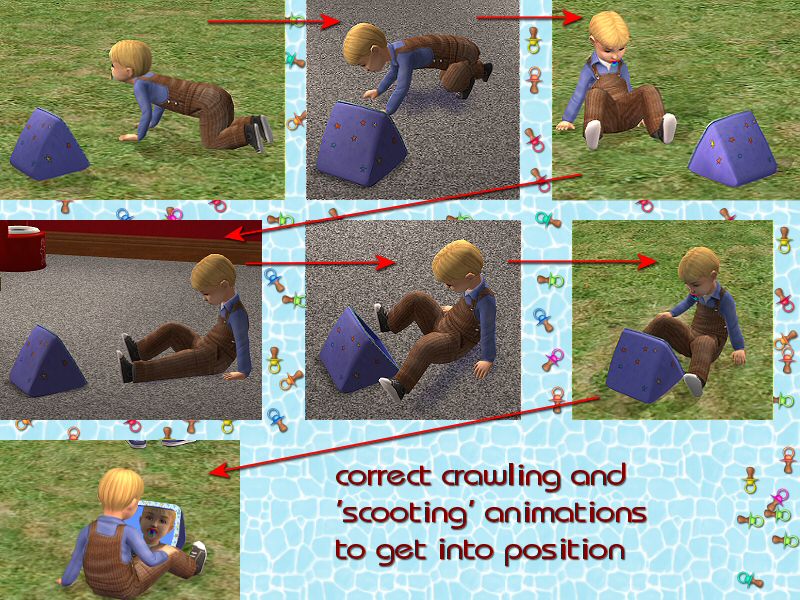
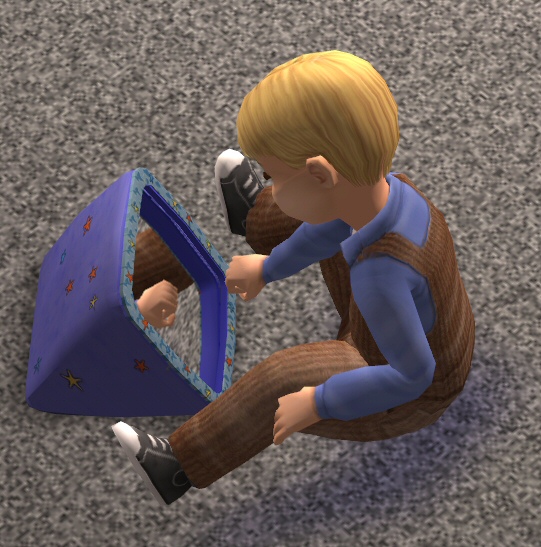
Whichever option you choose, your toddler will crawl close to the mirror...then change to the sitting position...and then 'scoot' up close to the mirror with their legs either side of it. Likewise, when the interaction is finished...your toddler will 'scoot' and crawl away from the mirror.
This new Toddler Mirror is only usable by Toddlers (other Sims will just get a 'There are no actions available' message)
Made with Milkshape SimPE v0.54 it has it's own unique (registered) GUID, is fully recolourable and is compatable with ALL games ( works with or without exapansion pack(s).
Polygon count = 624 (= good )
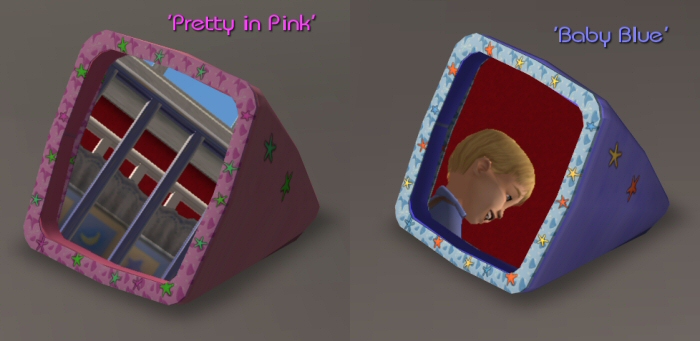
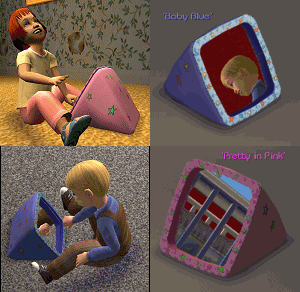
The single package contain two recolours....'Baby Blue'...and 'Pretty in Pink'. Deleting either of these colours will result in deleting the whole package and consequently the mirror itself.
You can change the colour at purchase time or using the design tool.
Price: 40 simoleons.
It can be found in the catalogue in Decorative/ Mirrors (for both Residential and Commercial).
The real thanks go to Numenor for making this such a wonderful object to use....so please take time to thank him for those things (I just made the mesh/textures.
This has been tested extensively using the base (original) game, but will also work with any additional expansion packs. Please report any issues you may find in this thread, which will be checked by
myself and Numenor regularly.
Have fun with your toddlers....
Bob & Numenor
(Thanks and stars always encourage us to make more... and we'll share them of course! )
Recolours: Feel free to post here at MTS2. Do not include the original mesh file in your recolours, .... please put a link back to here.
Lots: DO NOT include this item in any Lot uploads. You may include it in your screenshots, but please REMOVE this item before packaging and uploading your lot. Put a link in your lot upload for people to come to this thread to download it. This way, they will be getting the most recent version, which may include any updates since you downloadload it.
Please .... DO NOT CLONE .... or put on pay/donation sites.
DO NOT UPLOAD TO THE EXCHANGE ... UNDER ANY CIRCUMSTANCES
Please re-download. The files has the SAME name as the original release so it will simply overwrite you old file....
ADDED: New interaction for adults: now they can "Join" the toddler when he looks at himself in the mirror.
ADDED: The Toddler Mirror can now be "stepped over", like other small objects placed on the ground.
FIXED: The colour changing to pink at the end of the "Change Appearance" interaction.
FIXED: The interactions can now be correctly canceled.
FIXED: The message displayed when the Body skill point is gained doesn't mention any more the "Charisma" skill.
FIXED: The Catalogue Description now correctly displays the "+Body" tag (instead of "+Creativity").
(Also tested with OFB....works perfectly!)
***************************************************
boblishman & Numenor presents:
The 'Gussie' Toddler Mirror
Once again, Numenor and myself have teamed up to create a 'brand new' object. The 'Gussie' Toddler Mirror
This time it's a 'toddler friendly' mirror, made from a soft outer non- allergic man made material and an unbreakable (polished non-toxic metal coated) plastic mirror - for maximum protection for your little ones....

As usual, I just made the mesh and textures and Numenor did all the 'magic' in making it a 'usable' object for Toddlers. The mirror has a fully working reflection surface, and can only be placed on the ground (not surfaces) - because the toddler need to crawl to it in order to use it.
There are TWO pie menu options:
1) "Look who's in the mirror!" - This allows your Toddlers to 'play' with the mirror... This included several animations, but, more importantly, playing with the mirror will slowly increase their 'body skill - because your toddler is learning to take care their face (:confused
 ... and you will receive a custom message once the toddler has gained a body point!
2) "Change appearence" - This works the same as the 'change appearence' for other Sims, and will allow you to change hair, makeup, accessories etc.
Whichever option you choose, your toddler will crawl close to the mirror...then change to the sitting position...and then 'scoot' up close to the mirror with their legs either side of it. Likewise, when the interaction is finished...your toddler will 'scoot' and crawl away from the mirror.
This new Toddler Mirror is only usable by Toddlers (other Sims will just get a 'There are no actions available' message)
Made with Milkshape SimPE v0.54 it has it's own unique (registered) GUID, is fully recolourable and is compatable with ALL games ( works with or without exapansion pack(s).
Polygon count = 624 (= good
)The single package contain two recolours....'Baby Blue'...and 'Pretty in Pink'. Deleting either of these colours will result in deleting the whole package and consequently the mirror itself.
You can change the colour at purchase time or using the design tool.
Price: 40 simoleons.
It can be found in the catalogue in Decorative/ Mirrors (for both Residential and Commercial).
The real thanks go to Numenor for making this such a wonderful object to use....so please take time to thank him for those things (I just made the mesh/textures.
This has been tested extensively using the base (original) game, but will also work with any additional expansion packs. Please report any issues you may find in this thread, which will be checked by
myself and Numenor regularly.
Have fun with your toddlers....

Bob & Numenor
(Thanks and stars always encourage us to make more... and we'll share them of course! )
Recolours: Feel free to post here at MTS2. Do not include the original mesh file in your recolours, .... please put a link back to here.
Lots: DO NOT include this item in any Lot uploads. You may include it in your screenshots, but please REMOVE this item before packaging and uploading your lot. Put a link in your lot upload for people to come to this thread to download it. This way, they will be getting the most recent version, which may include any updates since you downloadload it.
Please .... DO NOT CLONE .... or put on pay/donation sites.
DO NOT UPLOAD TO THE EXCHANGE ... UNDER ANY CIRCUMSTANCES
This is a new mesh, and means that it's a brand new self contained object that usually does not require a specific Pack (although this is possible depending on the type). It may have Recolours hosted on MTS - check below for more information.
| Filename | Size | Downloads | Date | |||||
|
BobL-Numenor_ToddlerMirror_AllGames.zip
Size: 274.5 KB · Downloads: 119,784 · 28th Feb 2006 |
274.5 KB | 119,784 | 28th Feb 2006 | |||||
| For a detailed look at individual files, see the Information tab. | ||||||||
Key:
- - File was updated after upload was posted
Install Instructions
Basic Download and Install Instructions:
1. Download: Click the download link to save the .rar or .zip file(s) to your computer.
2. Extract the zip, rar, or 7z file.
3. Place in Downloads Folder: Cut and paste the .package file(s) into your Downloads folder:
1. Download: Click the download link to save the .rar or .zip file(s) to your computer.
2. Extract the zip, rar, or 7z file.
3. Place in Downloads Folder: Cut and paste the .package file(s) into your Downloads folder:
- Origin (Ultimate Collection): Users\(Current User Account)\Documents\EA Games\The Sims™ 2 Ultimate Collection\Downloads\
- Non-Origin, Windows Vista/7/8/10: Users\(Current User Account)\Documents\EA Games\The Sims 2\Downloads\
- Non-Origin, Windows XP: Documents and Settings\(Current User Account)\My Documents\EA Games\The Sims 2\Downloads\
- Mac: Users\(Current User Account)\Documents\EA Games\The Sims 2\Downloads
- Mac x64: /Library/Containers/com.aspyr.sims2.appstore/Data/Library/Application Support/Aspyr/The Sims 2/Downloads
- For a full, complete guide to downloading complete with pictures and more information, see: Game Help: Downloading for Fracking Idiots.
- Custom content not showing up in the game? See: Game Help: Getting Custom Content to Show Up.
- If you don't have a Downloads folder, just make one. See instructions at: Game Help: No Downloads Folder.
Recolours of this mesh
There are 3 recolours of this mesh on MTS:
Also Thanked - Users who thanked this download also thanked:
Packs Needed
None, this is Sims 2 base game compatible!
More Downloads BETA
Here are some more of my downloads: