
 Sign in to Mod The Sims
 Lots of Lots - Mini residential lots
 Lots of Lots - Mini residential lots
MTS has all free content, all the time. Donate to help keep it running.
SCREENSHOTS

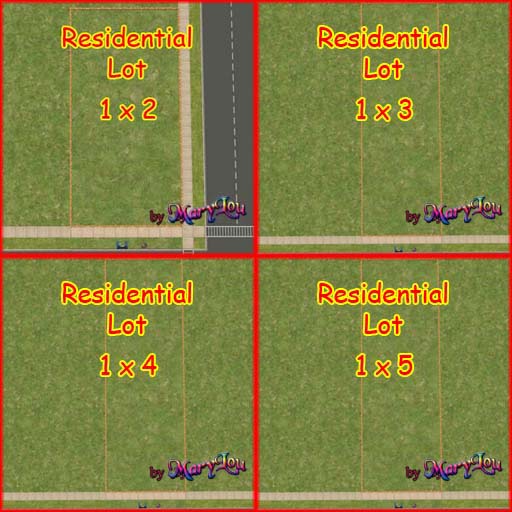
o-r-lots.jpg - width=768 height=512
vert-r-lots.jpg - width=512 height=512
Featured Upload!
This is a featured upload! It showcases the best talent and creativity available on MTS and in the community. 


Mini residential lots
THESE LOTS ARE COMPATIBLE WITH ANY EP AND THE BASE GAME
THESE LOTS ARE COMPATIBLE WITH ANY EP AND THE BASE GAME
All the sizes for mini residential lots.
In the archive Mini_Residential_Lots.rar you'll find all the horizontal sizes: 1x1 - 2x1 - 3x1 - 4x1 - 5x1 - 6x1.
The horizontal residential lots are the same as Andy's Small Lots , only with a more readable thumbnail
In the archive ML_Mini_Vertical-ResidentialLots.rar you'll find all the vertical sizes: 1x2 - 1x3 -1x4 - 1x5.
Please, look at the screenshots.
In the game you'll find the lots in the Lots & Houses Bin - > Unoccupied even if they are empty.
The various lots can be easily identified in the catalog, thanks to the clear thumbnails.
Don't look for them in the empty lots!!
You can easily increase their size with the LotExpander by Andi8104
Policy and License Agreement
Anyone can freely use these lots to build his own lots, as long as they are posted ONLY on free sites.
Credits and thanks
Many thanks and credits to Andy8104 for the Lot Expander, and for having created the 1x1 lot in the first place.
And, as usally, thanks to Numenor for his advice and suggestions.
Mini Community Lots can find HERE
If you are interested in Sunnyside Residential Mini-Lots you can find them HERE by aelflaed
If you like to get other mini-sizes, namely 2xN, you can find them HERE by plasticbox
| Filename | Size | Downloads | Date | |||||
|
ML_Mini_Vertical-ResidentialLots.rar
Size: 172.9 KB · Downloads: 48,971 · 9th Oct 2006 |
172.9 KB | 48,971 | 9th Oct 2006 | |||||
|
Mini_Residential_Lots.rar
Size: 325.8 KB · Downloads: 63,054 · 9th Oct 2006 |
325.8 KB | 63,054 | 9th Oct 2006 | |||||
| For a detailed look at individual files, see the Information tab. | ||||||||
Key:
- - File was updated after upload was posted
Install Instructions
Basic Download and Install Instructions:
1. Download: Click the download link to save the .rar or .zip file(s) to your computer.
2. Extract the zip, rar, or 7z file.
3. Install: Double-click on the .sims2pack file to install its contents to your game. The files will automatically be installed to the proper location(s).
1. Download: Click the download link to save the .rar or .zip file(s) to your computer.
2. Extract the zip, rar, or 7z file.
3. Install: Double-click on the .sims2pack file to install its contents to your game. The files will automatically be installed to the proper location(s).
- You may want to use the Sims2Pack Clean Installer instead of the game's installer, which will let you install sims and pets which may otherwise give errors about needing expansion packs. It also lets you choose what included content to install. Do NOT use Clean Installer to get around this error with lots and houses as that can cause your game to crash when attempting to use that lot. Get S2PCI here: Clean Installer Official Site.
- For a full, complete guide to downloading complete with pictures and more information, see: Game Help: Downloading for Fracking Idiots.
- Custom content not showing up in the game? See: Game Help: Getting Custom Content to Show Up.
Also Thanked - Users who thanked this download also thanked:
Packs Needed
None, this is Sims 2 base game compatible!
Policy and License Agreement
This policy applies to ALL my creations, unless otherwise stated on the download thread.
It's FORBIDDEN: to repost my stuff anywhere.
It's FORBIDDEN: to clone my creations.
It's ALLOWED: to create recolours for my objects (and post them on any site, including paysites), BUT you can't include the mesh in your recolour: you must give credits to me for the mesh, and provide a link to the mesh download thread.
It's ALLOWED: to include my creations in your lots, BUT the lots must be uploaded on 100% free sites (except the Exchange), and you must provide credits and a link to the download thread.
It's FORBIDDEN: to repost my stuff anywhere.
It's FORBIDDEN: to clone my creations.
It's ALLOWED: to create recolours for my objects (and post them on any site, including paysites), BUT you can't include the mesh in your recolour: you must give credits to me for the mesh, and provide a link to the mesh download thread.
It's ALLOWED: to include my creations in your lots, BUT the lots must be uploaded on 100% free sites (except the Exchange), and you must provide credits and a link to the download thread.
More Downloads BETA
Here are some more of my downloads: