
 Sign in to Mod The Sims
 *Updated* A Whole New Dimension: OMSPs Revisited and Improved!
 *Updated* A Whole New Dimension: OMSPs Revisited and Improved!




FlowerShack2resized.jpg - width=800 height=541
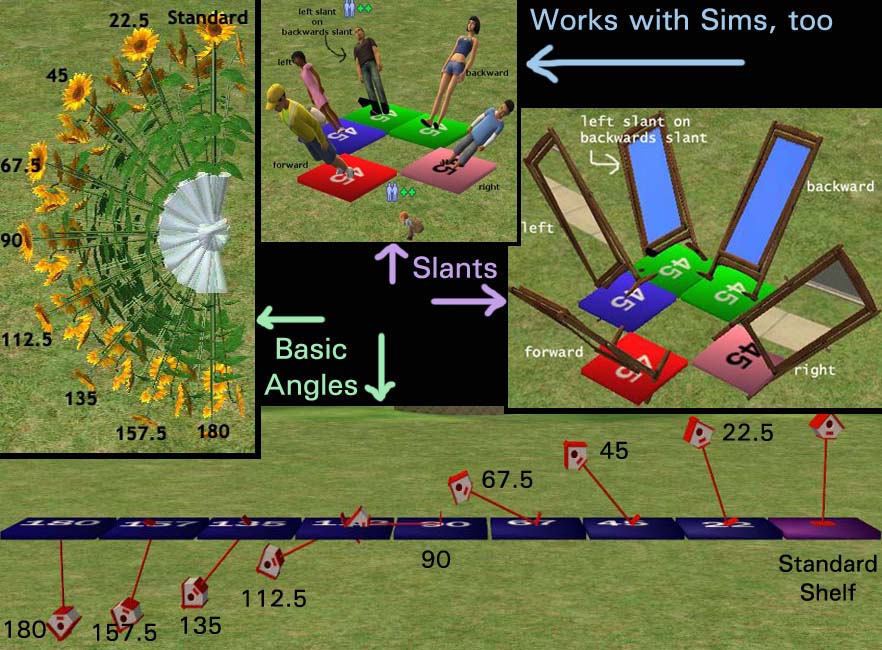
SlantsAndAngles.jpg - width=882 height=650
AllShelves.jpg - width=700 height=643
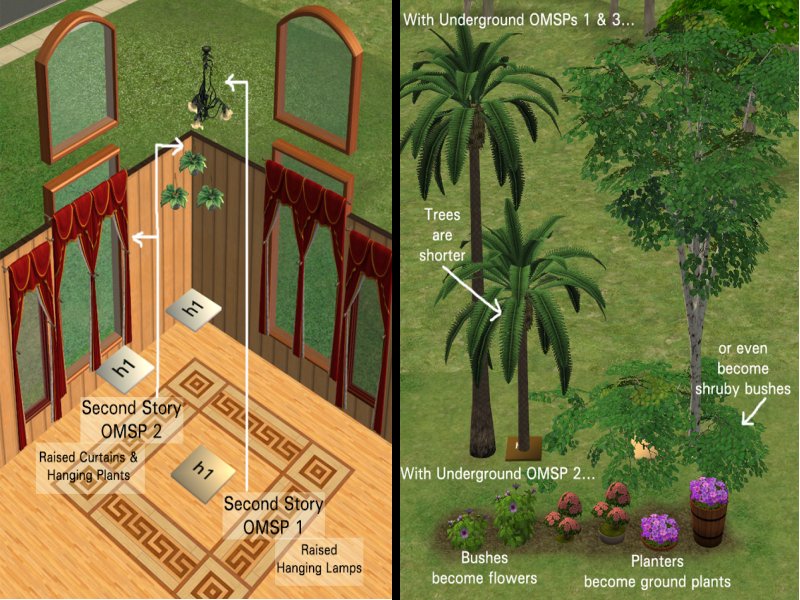
OverUnder.jpg - width=800 height=600
Underground & Second Story Shelves Example
ShelvesSpectrum.jpg - width=1057 height=216
The full spectrum of angles
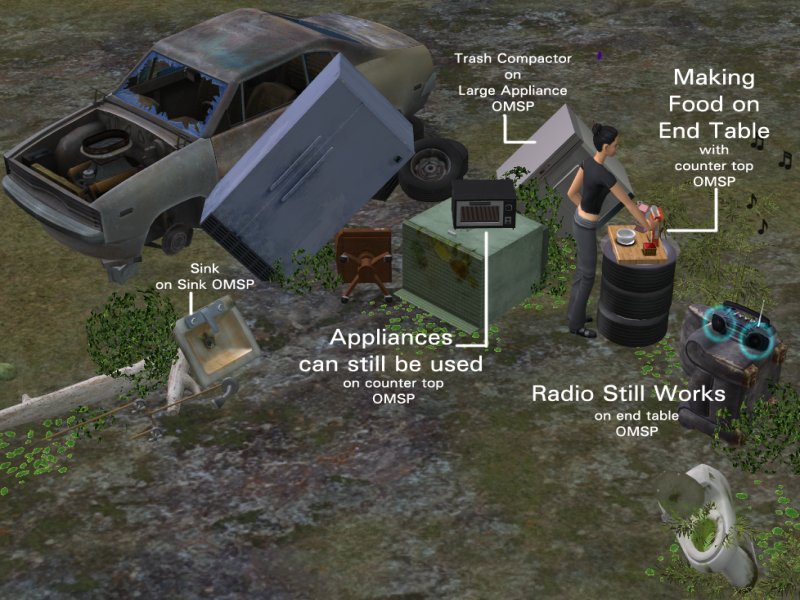
SpecialSlotsScaled.jpg - width=800 height=600
Special Slot OMSP example
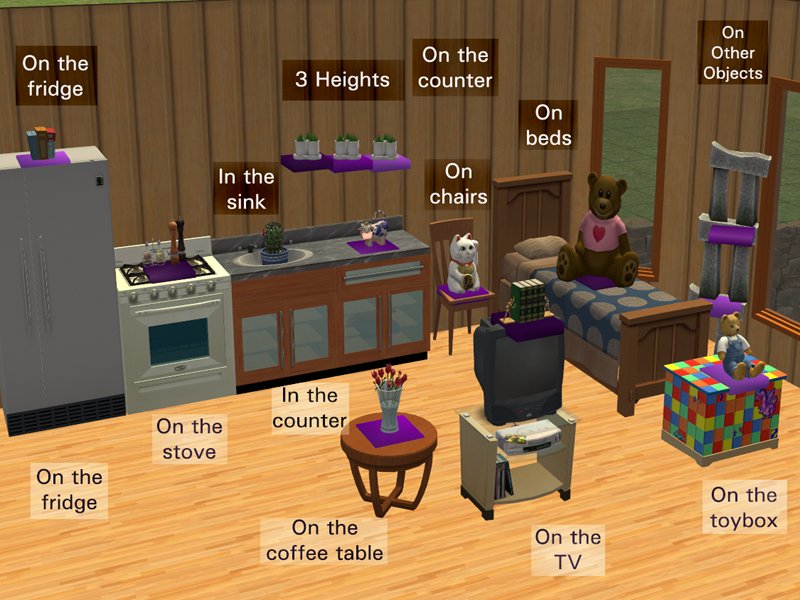
StandardPic.jpg - width=800 height=600
Standard Shiftable Shelves Example
Angles.jpg - width=800 height=530
Angles Example

Updated: 14th May 2009 at 6:26 PM - revisions, spelling
 Update: It has been pointed out to me that the Collection file included in this set is not showing up in some games. Thank you BrigitteSYW for reporting this, and thank you Numenor for suggesting how to fix it--AnyGameStarter rocks!
 So if the Collection has not been showing up for you, thereby making the In_Collection_ Only set worthless, please download BaseGame_Collection_Files.rar and add them to your Collection folder. I'm very, very sorry for this oversight on my part.
 Update 2-19-09: There is now a set that will ONLY show up in Collections, for people who hate cluttered buy mode catalogs. These are the same OMSPs and they will overwrite the others; they just won't show in the catalog at all, only in the OMSP Collection. You MUST have the Collection file in your Collections folder for these to work!
The file OMSPs_In_CollectionONLY.rar contains everything shown here--if you download this one, there's no need to download anything else. Just delete the sets out of it you don't want. **If you don't have AL, you need to download BaseGame_Collection_Files separately. See update at page top.
Hey, all! I come bringing loads of new OMSPs for your decorating enjoyment. With these shelves you will get a whole new range of placement choices to give the look of leaning or fallen objects. Some will require Apartment Life and some won’t, so let’s get to it.
Standard Shiftable Shelves – The OMSP to cover all others!
Do you have Apartment Life? Have you tried the uber-cool shifting paintings feature? Well these shelves have it, with an invisible recolor to boot. With these purple beauties you can finally access every possible height in the room!
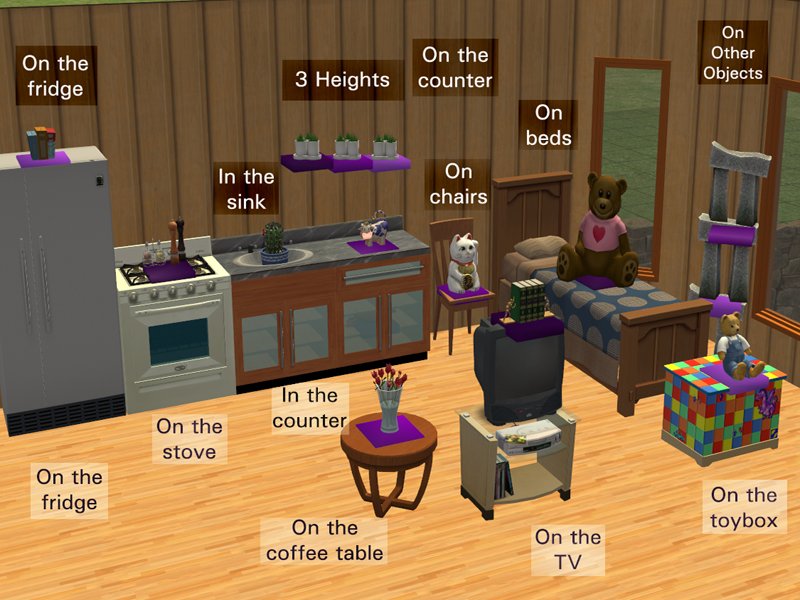
There are three closely related heights. If one shelf doesn’t shift to exactly the right level, try another—one of them will.
 The same shelves also come in a much larger size, suitable for big objects, but both sets will hold almost any 1-tile object, including sims!
 If you just want shiftable OMSPs and don't care about angles, you want "Standard-Shiftable-Shelves-AL.rar". These are also included in the OMSPs_In-CollectionONLY set, but they will still show in the catalog since they will probably be used more frequently than the rest.
 For the Base Game
If you don’t have Apartment Life Do Not Delete your other OMSPs! They need to be used along with these. The Basic Base Game OMSP is a plain black shelf that will hold almost any 1-tile object which can then be lifted onto any of your other OMSPs, or any other surface. This will even hold Sims! Put the Sim on the shelf, put the shelf on the table, the counter, the fireplace mantle, a bed-height OMSP—you get the point.
This one is included in the Base_Game_OMSPs.rar. It is also included in OMSPs_In_CollectionONLY.rar, but it still shows in the catalog since it's just one non-angled shelf.Bring on the Angles!
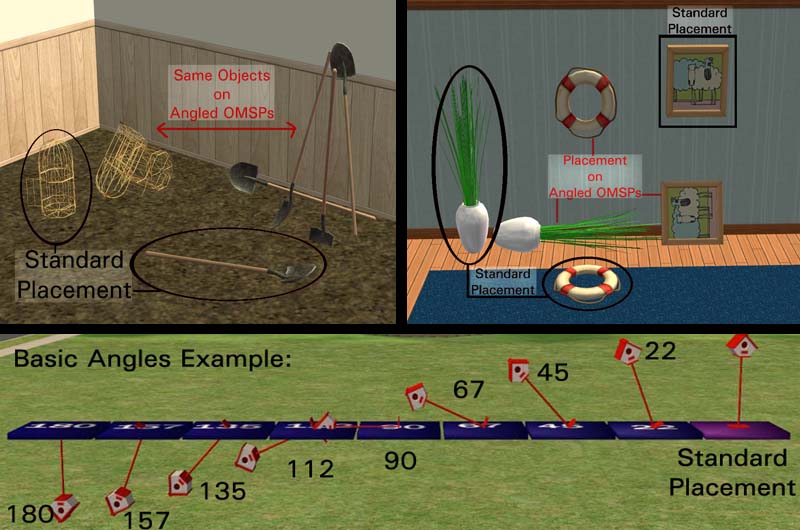
Alright, now for the fun part! These next shelves have the amazing ability to hold your objects at tilting angles:
For Apartment Life
You lucky people get the shiftable angled shelves. Just pick the shelf with the angle you want, put your object on it and click away! Like the others, these shelves will hold almost any 1-tile object, including Sims. Finally you’re not restricted to the standard position of objects. There are enough of these shelves to cover nearly every position you could possibly want for your content. They come in three heights each, for total shiftable coverage of the room. If one shelf doesn’t shift to the exact level you want, one of the other heights will.
These are the Angled-Shiftable-Shelves-AL.rar download, if you want them in the buy mode catalog, and are also in OMSPs_In_CollectionONLY.rar, if you don't want them in the buy mode catalog.For Base Game
If you don’t have Apartment Life, there is a set of angled shelves just for you, which will also hold Sims and almost any other 1-tile objects. These sit on the floor and most of these will need to be used with your other OMSPs. They will take a little more creativity and patience to use, but the results will be worth it. Some of your OMSPs will stack on the Basic Base Game OMSP (the plain black one), so with a little extra thought you can stack different OMSPs on each other to achieve even more height variations.
These are in the Base_Game_OMSPs.rar download, if you want them in the buy mode catalog, and also in OMSPs_In_CollectionONLY.rar, if you don't want them in the buy mode catalog. Make sure you also grab BaseGame Collection Files if you don't have AL.Even More Angles!
As an afterthought I also made finer angles, to give you even more choices on how your objects will lie. These only come in Base Game style, but they will stack on the shiftable shelves, so put your object on one of these, put the shelf on one of the shiftables and you’re ready to click to the right height. These are the "Extra Angles" file, and there is a thumbnail picture below that shows the full spectrum of these and the basic angles.
These are in the ExtraAngles-BaseGame.rar download, if you want them in the buy mode catalog, and also in OMSPs_In_CollectionONLY.rar, if you don't want them in the buy mode catalog. Again, if you don't have AL make sure to grab the BaseGame Collection Files, too.Over and Under Ground
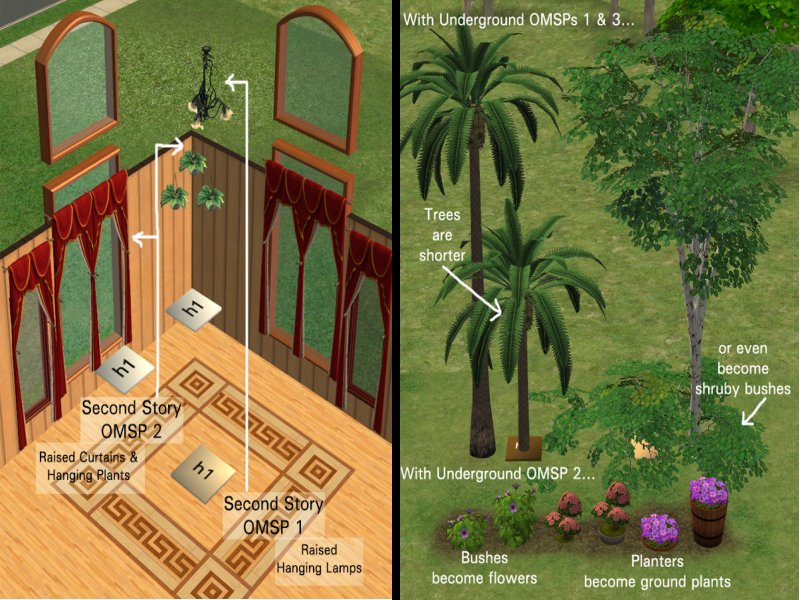
For Apartment Life players here is another set of shiftable shelves, this time with a very unique purpose: to hold objects underground or at a second story level.
Underground—Bury Your Stuffs!
There are three ‘underground’ shelves: one holds objects 1 level underground, one holds objects 2 levels underground, which both shift upward; and one holds objects at ground level and will shift downward, for partially buried things. These are excellent for landscaping.
Above Ground—You Can Fly!
There are two above ground, or ‘second story’, shelves. One holds objects at ground level and clicks up, which is useful for slightly raising hanging plants and curtains; the other holds objects at second floor level and clicks up, which you may or may not have use for.
These shelves are neutral colors—brown, light brown, tan, cream and white. There are three heights, like the other shiftables, and the heights are written on the shelves.
These are in the Over-Under Ground-AL.rar download, if you want them in the buy mode catalog, and also in OMSPs_In_CollectionONLY.rar, if you don't want them in the buy mode catalog.For Special Use
Now we hit the first exception to what these buggers will hold: anything with limited placement flags. What does this mean? Well, when you try to put a table lamp on the floor the game tells you “it must be placed on one of these surfaces…” and lists off things like counter, table, end table, desk. These shelves are none of those, but these OMSPs bypass that restriction.
If you want to use phones, table lamps, alarm clocks or small radios with the shiftable or angled shelves, you need this set!
These are also color coded for easy finding.
The end table shelf is yellow. It will hold anything that can go on an end table, mainly things that will only go on an end table like table lamps and small electronics.
This shelf also allows for food preparation! Yes, if this shelf is empty and the other counters are full (or not there at all), sims will make food on it, even if it’s on the floor! They will still stand up to do it, so it looks funny...
 The end table shelf is yellow. It will hold anything that can go on an end table, mainly things that will only go on an end table like table lamps and small electronics.
Be aware that the under-sink texture is not there at all, so it looks quite odd, but sims will still use it, even lying on the ground.
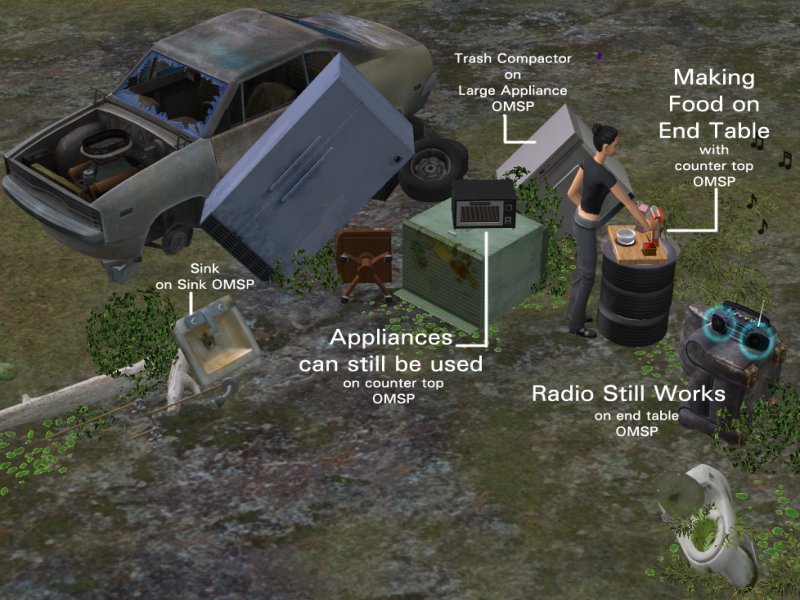 The special use OMSPs are in the Special Slots-BaseGame.rar, if you want them in the buy mode catalog, and also in the OMSPs_In_CollectionONLY.rar, if you don't want them in the buy mode catalog.
Known Issues and Special Points
- Sims can be placed on these shelves without crashing your game. I tested this many times, even saving, leaving and re-entering lots with Sims on these shelves, with no problems. Upon re-entering a lot, Sims will appear beside the shelf and jump back almost immediately.
- Sims on these shelves can interact with other Sims, if one Sim is on plain game-floor. Sims on the shelves cannot get off of them on their own, and they will die of starvation if left too long.
- Most objects placed on these shelves can still be used, but the animations are off, and some objects might jump to their normal positions while being used. Sims will try to use objects placed on these, and will complain if they can't.
- These shelves will not block your Sims. If they do, I’ve messed up somewhere and I will fix it immediately if you let me know; but in my testing I never had a Sim’s path get blocked by these. They were actually more likely to walk right through objects on these shelves that they shouldn’t have, like large statues…
- The Shiftable Shelves will jump on top of each other! If two empty shelves are place on the same tile they will automatically stack. To avoid this, place an object on one before putting it on the same tile as another.
- Large Grab-able Area These shelves are big so the base game shelves will stack on the shiftable shelves without getting lost in each other, and so large objects can be placed on them without the shelf getting lost underneath. This means you can accidentally grab these while trying for something else, and it can be annoying. I’m very sorry for this and if people want I will make them smaller, but small ones have their own set of problems.
- Shiftable Height Reset If you grab a shiftable shelf and release it with ‘esc’ it will reset to the original height. To avoid this, don’t hit ‘esc’—just replace it with the hand tool.
- Objects Rotating Out of Place If you try to rotate an object once it has been placed on the angled shelves it will revert to the normal, upright position (like plane seats! ) Sometimes the object will rotate by itself after you release it. If this happens, just re-place the object. **The shelf can be rotated, just not the object on the shelf.
- Objects Not Deleting Off the Shelves Some objects will not delete directly off the shelves; instead you have to place them on the ground and then delete them. This happens with refrigerators, televisions, and flower plots, and probably some other things too.
- Vanishing Shelves?? If you zoom in too close while placing one of these it can tend to disappear, and if this happens just zoom out until it pops back up. I’m not sure why this happens.
- MOAR Angles! Shelves of different slants can be combined for different results. If you place an object on a backward slanted shelf and put that on a on a left slanted shelf the object will be leaning backwards and to the left. Neat.
- What won't go on these? Certain objects, even if they are 1-tile, won't sit on these shelves. The main ones are tables and some coffee tables, but you will most certainly run into more.
- Twitchy Counter Shelf The counter shelf has weird scratchy texture and can be hard to grab at times, which can make it difficult to place, but it's worth it to see your Sims make cereal on their dresser in the morning.


Slants & Angles: An Explanation
This is boring, but necessary.
Slants
These shelves come in four different 'slants': forward slant, backward slant, left slant and right slant. At first you may not see a difference between these, but for some objects there is a huge difference!
If you put a Sim a forward slant shelf he is leaning forward, looking at the ground. If you rotated the shelf so he was leaning backward, he would still be looking at the ground. If you want him looking up at the sky he must be on a backward slant shelf.
If your object has a definite 'front' it may take a couple tries to find the right slant for the pose you want. You will get used to this though.
Angles
Along with a slant direction, every shelf has an 'angle'. The angle simply says to what degree the object will be leaning in the 'slant' direction. Any object put on a shelf with a number above 90 will be pointing downward, into the ground.
Each set of 'slants' has a range of 8 angles. If you also have the 'Extra Angles', your base game OMSPs will have 16 angles for each set of 'slants'.
 So how do I tell them apart??
 There are a lot of these shelves. You will tell them apart by color:
I know this sounds confusing, but once you see it in game I think you will catch on very quickly. The shelves also have very clear object descriptions to help you, and there is a collection file in which all the shelves are neatly organized.
The Collection File goes in My Documents > EA Games > The Sims 2 > Collections Don't want your catalog cluttered with these?
If you don't want pages of these blocks cluttering you catalog, there is a download just for you.
OMSPs_In_CollectionONLY.rar contains everything shown above, and the only blocks that will show in the Buy Mode Catalog are the six Standard Shiftable Shelves and the one Basic Base Game OMSP. All the others will ONLY show in the Collection Folder.
You must have the Collection Files for these to work! Once you download:
- People without Apartment Life can delete the files that have "AL" in the name. Do be sure to also download the BaseGame Collection Files!
- People with Apartment Life can delete "Base Game OMSPs", as they are redundant to the Shiftable Angled Shelves.
These do take time to get use to, and a lot of time and patience to use, but all in all it should open up a whole new realm of possibilities for your game. I hope you all enjoy these very much.
The base game shelves were all cloned from the Moroccan end table. The shiftable shelves were clone from the little wall shelf in Apartment Life. The small appliance/food prep shelf was made using Numenor’s counter template. All are found under Surfaces > Miscellaneous for $1.
Custom Content in the Pics:
The bird cage is by Apollo at Garden of Shadows. It is very beautiful in game--the picture doesn't do it justice.
The shovel is by Aikea_guinea at Club Crimsyn.
Polygon Counts:
They all have the same simple cube mesh:
face count = 12, vertex count = 16
except for the food prep shelf:
face count = 16, vertex count = 31
Additional Credits:
Credit should definitely go to ariffrazalin, who first brought us OMSPs (I think), and to JohnBrehaut1, who brought us lots more. Thank you!
Also, many thanks to Numenor for his "Introduction to Slots" article, and to fisheeyes for his tutorial on creating working slots for extended objects. I learned a lot about slots doing that one--thanks much!
To Numenor for his counter templates, and for the AnyGameStarter which I used to make the BaseGame Collections.
Credit goes to IgnorantBliss for her tutorial on adding a subset and making it recolorable, which I refer to so much I should just frame it by the computer.
The tiny wall shelf was lacking texture and I had to turn to this tutorial once more to get it working.Many, many, many thanks to Bobcatben for making the SMD importer/exporter for Blender! Thank you!
And to Lord Darcy, for a mini tutorial on removing shadows which I ran into while browsing the Peasantry at MATY. Without it these shelves would still have the "from the sun" shadow that all objects get normally.
I know there's more, because I have gleaned so much information from this site and the rest of the community, but I can't think of any more by name right now.
Do what you want with these, except no posting them to paysites, please. If you clone them, credit would be nice, of course, but other than that, feel free to tear them open, rip out numbers and add them to your own things, or upload them with your lots. I'm very excited to see what people do with these.
This is a new mesh, and means that it's a brand new self contained object that usually does not require a specific Pack (although this is possible depending on the type). It may have Recolours hosted on MTS - check below for more information.
| Filename | Size | Downloads | Date | |||||
|
BaseGame_Collection_Files.rar
| If you don't have AL, you probably need these Collection files.
Size: 4.3 KB · Downloads: 23,596 · 2nd Apr 2009 |
4.3 KB | 23,596 | 2nd Apr 2009 | |||||
|
OMSPs_In_CollectionONLY.rar
| This set will ONLY show in the Collection--contains All Blocks! (Non AL users still need Base Game Collection Files, though.)
Size: 1.38 MB · Downloads: 40,812 · 19th Feb 2009 |
1.38 MB | 40,812 | 19th Feb 2009 | |||||
|
Standard-Shiftable- Shelves-AL.rar
| If you just want Shifting OMSPs, Download This
Size: 28.9 KB · Downloads: 31,407 · 16th Feb 2009 |
28.9 KB | 31,407 | 16th Feb 2009 | |||||
|
SilentLucidityOMSPsCollection.rar
| Collection File for AL users--Goes in The Sims 2 > Collections
Size: 3.6 KB · Downloads: 25,047 · 16th Feb 2009 |
3.6 KB | 25,047 | 16th Feb 2009 | |||||
|
Angled-Shiftable-Shelves-AL.rar
| Angled OMSPs that shift--Needs Apartment Life
Size: 575.3 KB · Downloads: 27,418 · 16th Feb 2009 |
575.3 KB | 27,418 | 16th Feb 2009 | |||||
|
Special Slots-BaseGame.rar
| slots for appliances, lamps, food prep--base game compatible
Size: 304.1 KB · Downloads: 30,662 · 13th Feb 2009 |
304.1 KB | 30,662 | 13th Feb 2009 | |||||
|
Over-Under Ground-AL.rar
| needs Apartment Life
Size: 87.3 KB · Downloads: 27,676 · 13th Feb 2009 |
87.3 KB | 27,676 | 13th Feb 2009 | |||||
|
ExtraAngles-BaseGame.rar
| more angle options--base game compatible
Size: 199.3 KB · Downloads: 29,416 · 13th Feb 2009 |
199.3 KB | 29,416 | 13th Feb 2009 | |||||
|
Base Game OMSPs.rar
| the base game set of angled shelves
Size: 206.1 KB · Downloads: 40,623 · 13th Feb 2009 |
206.1 KB | 40,623 | 13th Feb 2009 | |||||
| For a detailed look at individual files, see the Information tab. | ||||||||
Key:
- - File was updated after upload was posted
Install Instructions
1. Download: Click the download link to save the .rar or .zip file(s) to your computer.
2. Extract the zip, rar, or 7z file.
3. Place in Downloads Folder: Cut and paste the .package file(s) into your Downloads folder:
- Origin (Ultimate Collection): Users\(Current User Account)\Documents\EA Games\The Sims™ 2 Ultimate Collection\Downloads\
- Non-Origin, Windows Vista/7/8/10: Users\(Current User Account)\Documents\EA Games\The Sims 2\Downloads\
- Non-Origin, Windows XP: Documents and Settings\(Current User Account)\My Documents\EA Games\The Sims 2\Downloads\
- Mac: Users\(Current User Account)\Documents\EA Games\The Sims 2\Downloads
- Mac x64: /Library/Containers/com.aspyr.sims2.appstore/Data/Library/Application Support/Aspyr/The Sims 2/Downloads
- For a full, complete guide to downloading complete with pictures and more information, see: Game Help: Downloading for Fracking Idiots.
- Custom content not showing up in the game? See: Game Help: Getting Custom Content to Show Up.
- If you don't have a Downloads folder, just make one. See instructions at: Game Help: No Downloads Folder.
#OMSP, #OMSPs, #one more slot, #angled, #angle, #rotated, #rotate, #shiftable, #sheft, #shelves, #sim shelf, #sim shelves, #base game, #base game shelves
More Downloads BETA
Here are some more of my downloads: