
 Sign in to Mod The Sims
 No Smiling in CAS
 No Smiling in CAS
MTS has all free content, all the time. Donate to help keep it running.
SCREENSHOTS
NoSmile.jpg - width=442 height=442
Picked Upload!
This is a picked upload! It showcases some of the best talent and creativity available on MTS and in the community.

Created by Neder
Uploaded: 3rd Jul 2010 at 4:04 AM
Updated: 5th Jul 2010 at 3:52 AM - Added functionality
Updated: 5th Jul 2010 at 3:52 AM - Added functionality
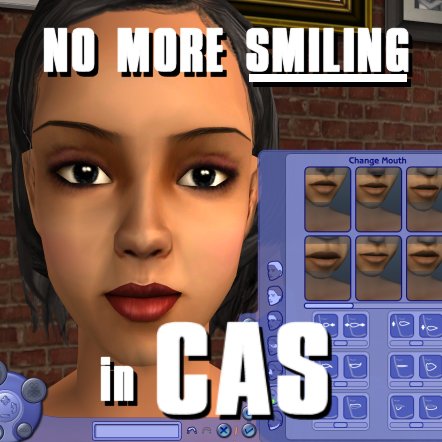
Pretty much self-explanatory.
Sims no longer have that constant little smirk while you're editing the face/hair/makeup in CAS. They also won't cut loose with that huge stupid grin.
Five years too late, I know.
They will still exhibit some stupid expressions after selecting a hair, for example, but then they will revert to a neutral expression.
All full body idles (like that cute little "I love this outfit!" shimmy) are still intact.
EDIT: I initially forgot that CAS/YCAS use different groups. If you have UNI and want the functionality in YCAS, download both files.
UPDATE 07/04/10 : I can't seem to kill all the facial idles for toddlers. They will still breathe, blink and have the corners of their mouths turned up. The "Joker" grinning does seem to be gone, however.
Additional Credits:
Not possible without SimPE
Sims no longer have that constant little smirk while you're editing the face/hair/makeup in CAS. They also won't cut loose with that huge stupid grin.
Five years too late, I know.
They will still exhibit some stupid expressions after selecting a hair, for example, but then they will revert to a neutral expression.
All full body idles (like that cute little "I love this outfit!" shimmy) are still intact.
EDIT: I initially forgot that CAS/YCAS use different groups. If you have UNI and want the functionality in YCAS, download both files.
UPDATE 07/04/10 : I can't seem to kill all the facial idles for toddlers. They will still breathe, blink and have the corners of their mouths turned up. The "Joker" grinning does seem to be gone, however.
Additional Credits:
Not possible without SimPE
| Filename | Size | Downloads | Date | |||||
|
MTS2_NDR_NoYCASSmiling.zip
Size: 10.3 KB · Downloads: 30,909 · 3rd Jul 2010 |
10.3 KB | 30,909 | 3rd Jul 2010 | |||||
|
MTS2_NDR_NoCASSmiling.zip
Size: 10.9 KB · Downloads: 48,111 · 3rd Jul 2010 |
10.9 KB | 48,111 | 3rd Jul 2010 | |||||
| For a detailed look at individual files, see the Information tab. | ||||||||
Key:
- - File was updated after upload was posted
Install Instructions
Basic Download and Install Instructions:
1. Download: Click the download link to save the .rar or .zip file(s) to your computer.
2. Extract the zip, rar, or 7z file.
3. Place in Downloads Folder: Cut and paste the .package file(s) into your Downloads folder:
1. Download: Click the download link to save the .rar or .zip file(s) to your computer.
2. Extract the zip, rar, or 7z file.
3. Place in Downloads Folder: Cut and paste the .package file(s) into your Downloads folder:
- Origin (Ultimate Collection): Users\(Current User Account)\Documents\EA Games\The Sims™ 2 Ultimate Collection\Downloads\
- Non-Origin, Windows Vista/7/8/10: Users\(Current User Account)\Documents\EA Games\The Sims 2\Downloads\
- Non-Origin, Windows XP: Documents and Settings\(Current User Account)\My Documents\EA Games\The Sims 2\Downloads\
- Mac: Users\(Current User Account)\Documents\EA Games\The Sims 2\Downloads
- Mac x64: /Library/Containers/com.aspyr.sims2.appstore/Data/Library/Application Support/Aspyr/The Sims 2/Downloads
- For a full, complete guide to downloading complete with pictures and more information, see: Game Help: Downloading for Fracking Idiots.
- Custom content not showing up in the game? See: Game Help: Getting Custom Content to Show Up.
- If you don't have a Downloads folder, just make one. See instructions at: Game Help: No Downloads Folder.
Also Thanked - Users who thanked this download also thanked:
by Nopke
About Me
Feel free to use my uploads as you see fit. Redistribute at will to free sites only, please.
I don't "make" anything; I just push pixels and rearrange numbers!
I don't "make" anything; I just push pixels and rearrange numbers!
More Downloads BETA
Here are some more of my downloads: