
 Sign in to Mod The Sims
 UI Mod--CAS Moles--See more Freckles, Beauty Marks, and Wrinkles
 UI Mod--CAS Moles--See more Freckles, Beauty Marks, and Wrinkles
MTS has all free content, all the time. Donate to help keep it running.
SCREENSHOTS

CAS Moles Screenshot.jpg - width=398 height=424
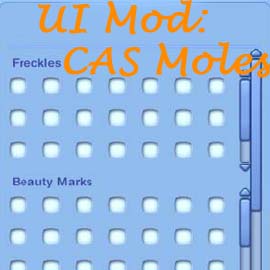
CAS Moles Thumb.jpg - width=270 height=270

Welcome to my second uploaded UI mod. This mod was actually the first mod I ever made as part of the MTS community, but due to a more exciting finding of mine (custom skintones), this got lost in the chaos. I originally made this mod to help Daluved1 fix an issue with the UI that was preventing her from fully realizing her custom beauty marks.
What This Mod Does:
It actually does very little the game couldn't already do, I just made it so you can see it doing it.
This changes the visible layout of the Topical Details section of CAS. Under normal circumstances, the game will only show up to seven freckles, five beauty marks, and five wrinkles at one time without overloading the UI and having some become visibly inaccessible. This mod fixes that.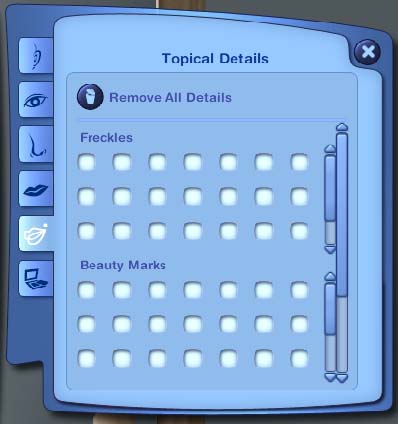
As one can see in the image, I have changed the limit of visible picks to 21 at a time; further, I made it so that the scroll bar is now functional if you add more than the UI can show at one time.
Because it was not necessary to resize the overall UI (and therefore wouldn't cause any part of the UI to become inaccessible on various screen resolutions) there is only one version of this mod.
For demonstration purposes, my screenshot includes more freckles and beauty marks than available. As far as I know, Daluved's 8 new beauty marks and the base game ones are the only available content that would utilize the new UI. However, CTU is capable of making new freckles, beauty marks and wrinkles.
Tutorial for Making New Freckles/Moles
Daluved1 has a video tutorial outlining how to make new freckles, moles or wrinkles over at The Sims Supply. If you are attempting to make new freckles/moles and run into issues, please do not ask for help here; instead please search the Modding Discussion->CAS Parts forum for related issues, or create a new post if you don't find a similar thread.
Installation Instructions:
The download is a 7z archive containing a standard package file. Extract it and place it in your mods/packages folder.
If by chance you have the old UI layout mod linked from Daluved's download, remove the old one (this new one is far superior).
Technical Information:
This is a default replacement layout file of the CASMoles.layo (0xDB98CEF8DAE07B3C) found in the UI.package file.
Compatibility:
This mod does not conflict with any other known mod.
Version information:
This mod is known to work with the following game versions:
Base1.14/WA2.9/HELS3.5/AMB4.2
Base1.12/WA2.4/HELS3.3/AMB4.0
This mod is thought to work with previous game game versions through Base1.7; no support will be given, use at you own risk with older versions.
Additional Info:
Mod originally proposed by Daluved in this thread.
What This Mod Does:
It actually does very little the game couldn't already do, I just made it so you can see it doing it.
This changes the visible layout of the Topical Details section of CAS. Under normal circumstances, the game will only show up to seven freckles, five beauty marks, and five wrinkles at one time without overloading the UI and having some become visibly inaccessible. This mod fixes that.
As one can see in the image, I have changed the limit of visible picks to 21 at a time; further, I made it so that the scroll bar is now functional if you add more than the UI can show at one time.
Because it was not necessary to resize the overall UI (and therefore wouldn't cause any part of the UI to become inaccessible on various screen resolutions) there is only one version of this mod.
For demonstration purposes, my screenshot includes more freckles and beauty marks than available. As far as I know, Daluved's 8 new beauty marks and the base game ones are the only available content that would utilize the new UI. However, CTU is capable of making new freckles, beauty marks and wrinkles.
Tutorial for Making New Freckles/Moles
Daluved1 has a video tutorial outlining how to make new freckles, moles or wrinkles over at The Sims Supply. If you are attempting to make new freckles/moles and run into issues, please do not ask for help here; instead please search the Modding Discussion->CAS Parts forum for related issues, or create a new post if you don't find a similar thread.
Installation Instructions:
The download is a 7z archive containing a standard package file. Extract it and place it in your mods/packages folder.
If by chance you have the old UI layout mod linked from Daluved's download, remove the old one (this new one is far superior).
Technical Information:
This is a default replacement layout file of the CASMoles.layo (0xDB98CEF8DAE07B3C) found in the UI.package file.
- It is not a core mod
Compatibility:
This mod does not conflict with any other known mod.
Version information:
This mod is known to work with the following game versions:
Base1.14/WA2.9/HELS3.5/AMB4.2
Base1.12/WA2.4/HELS3.3/AMB4.0
This mod is thought to work with previous game game versions through Base1.7; no support will be given, use at you own risk with older versions.
Additional Info:
Mod originally proposed by Daluved in this thread.
| Filename | Size | Downloads | Date | |||||
|
UI Mod - CASMoles.7z
| UI mod expanding the interface to allow more Freckles, Beauty Marks, and Wrinkles to be shown.
Size: 3.1 KB · Downloads: 73,299 · 8th Jul 2010 |
3.1 KB | 73,299 | 8th Jul 2010 | |||||
| For a detailed look at individual files, see the Information tab. | ||||||||
Key:
- - File was updated after upload was posted
Install Instructions
Recommended
The creator also recommends the following uploads:
Also Thanked - Users who thanked this download also thanked:
News & Current Projects
http://dl.dropbox.com/u/543053/Sims3%20Mods/Plumbob.gif
08JULY2010
CAS Mods:
(Projects I've started, but have been postponed)
News
http://dl.dropbox.com/u/543053/Sims3%20Mods/Plumbob.gif08JULY2010
- As many have seen, my second, but first mod is out in the DLs section; Enjoy!
- Many people have been sending me PMs about ideas about how to fix CAS; I appreciate the enthusiasm, but I am only one person so time can only tell when I will be able to work on all the good ideas.
- Updated the section below.
Current Projectshttp://dl.dropbox.com/u/543053/Sims...s/GuineaPig.gif
CAS Mods:
- New CAS Tab: Body
- CASBody Tab: Sliders (3 regions: Global, Female, Male)
- CASBody Tab: hair
- CASBody Tab: moles/freckles/birthmarks/scars
- CASMoles Tab: scars
- Layerable Piercings
- Assign Makeup per outfit
- Fix Makeup layering
- Non-Default Eyes (non-costume makeup)
- Separate Face/Scalp skin from Body skin (make independently selectable)
(Projects I've started, but have been postponed)
- Leopard Fur NDST
- Morphable Tail accessory
- Morphable Male Anatomy (if I ever decide to finish, it will be on the Adult site).
- Non-default TV Channels--Replacement TV Channels are able to be made according to this thread, so I think I will poke at the core to see if Non-defaults can be made.